
AVAILABLE SPRING 2026
Query Studio Pro
AI-powered SQL editor that turns hours of SFMC query debugging into minutes.
OVERVIEW
What is Query Studio Pro?
Query Studio Pro is a professional SQL editor purpose-built for Salesforce Marketing Cloud. It gives your team a dedicated workspace to write, test, and optimize SFMC queries — with real-time autocomplete that knows your Data Views, Data Extensions, and field types.
Stop writing queries blind. Query Studio Pro connects directly to your SFMC environment and gives developers and architects the tools they need to build faster, catch errors before they run, and spend less time debugging.
For teams that want to go further, the Max tier adds AI-powered query assistance — generate SQL from plain English, get instant error explanations, and receive optimization suggestions tailored to SFMC’s SQL dialect.
UPGRADE YOUR WORKFLOW
ESSENTIALS FEATURES
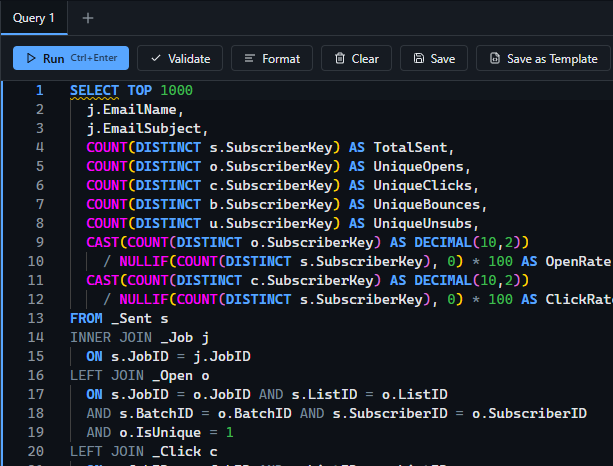
SFMC-aware SQL editor with syntax highlighting
A full-featured editor with syntax highlighting built specifically for Marketing Cloud’s SQL dialect.
Intelligent Autocomplete
Get real-time suggestions for Data Views, Data Extensions, and field names as you type.
Real-Time Linting
Catch syntax errors and SFMC-specific issues before you ever hit run.
Data View & Data Extension Browser
Browse your org’s data schema without leaving the editor. See field names, types, and relationships at a glance.
Query Templates & Snippets
Start from pre-built templates for common SFMC query patterns like deduplication, engagement filtering, and subscriber lookups.
Multi-Tab Editor
Work on multiple queries side by side with persistent sessions that save your progress.
Query History
Every execution is logged so you can revisit, compare, and reuse past queries.
Export & Import SQL Library
Export and import your entire SQL query library via JSON export.
SUPERCHARGE YOUR WORKFLOW
MAX FEATURES
AI Query Assistant
Describe what you need in plain English and get working SFMC-ready SQL in seconds.
AI Query Fix
Paste a failed query and get an instant, human-readable breakdown of what went wrong and how to fix it.

AI Query Optimization
Get performance recommendations tailored to SFMC’s query engine, including indexing hints and JOIN improvements.
Natural Language to SQL
Turn business questions like “find subscribers who opened in the last 30 days but didn’t click” into production-ready queries.

Find the Perfect Fit for Your Budget
Choose from our range of flexible pricing options that cater to your specific needs.
Essentials
Billed monthly/annually – Unlimited Users
$599/org/mo
Get notified when Query Studio Pro is available.
Max
Billed month/annually – Unlimited Users
$1299/org/month
Get notified when Query Studio Pro is available.
Frequently Asked Questions
Find answers to commonly asked questions about our products and services.
How does Query Studio Pro connect to my SFMC environment?
Query Studio Pro authenticates through Salesforce Marketing Cloud’s OAuth flow. Your credentials are never stored — we use short-lived access tokens managed by SFMC.
Does Query Studio Pro store our subscriber data?
No. Query results are displayed in your browser session and are never persisted on our servers. We store only your account metadata (name, email) and saved queries.
Is pricing per user or per org?
Per org. Your entire team can use Query Studio Pro under a single subscription — no per-seat fees.
What happens when my trial ends?
After 14 days, your account moves to a read-only state until you subscribe. Your saved queries and settings are preserved.
Does it work with all SFMC Business Units?
Yes. Query Studio Pro works with any Business Unit your authenticated user has access to.
What SQL dialect does Query Studio Pro support?
SFMC’s SQL subset, which is based on T-SQL. The editor, linter, and AI assistant are all tuned specifically for SFMC’s supported syntax and functions.
Still have a question?
If you have any other queries, feel free to reach out to us. Our knowledgeable team is here to help!